Clamshell mode
When the screen goes out, close the lid

I had a minor adventure this week, specifically on the last day of the year, Dec. 31.
In an effort to “clean the screen” of my MacBook Pro — something that always looked smeary and fingerprinted, especially noticeable during the morning hours when bright sunlight filtered through the eastern-facing kitchen blinds — I gathered Windex, isopropyl alcohol, and Q-tips. I used the Q-tips to dip into the alcohol and gently rubbed the keys, and then I sprayed the screen. At some point in the process, the screen went blank. I couldn’t tell if I’d killed the whole thing or what. There wasn’t even a bang or a whimper. Just darkness.
I took a breath, knowing that any immediate action would probably just make things worse. I still had my phone, and I could access Gemini. First, I had to determine if the laptop was still alive or if the screen was merely moribund. I powered off and restarted the machine. There was no “ping.” I soon learned that if the caps lock key is lit, the computer is still functional. The keyboard worked, but apparently the liquid I had sprayed had gotten into the hoojie-jigger above the keys — the little holes you never notice at the back of the keyboard and under the screen, hidden by a strip of metal.
Had I flooded the engine? Drowned the keys, the processor, the living guts?
Thus began some gymnastics, all spurred by my trainer, Gemini — I’ve yet to give AI a personal name; I haven’t gone that far yet.’
I learned that on a 2021 MacBook Pro, the primary vents sit near the hinge, where the screen meets the body, and along the side intakes.
To maximize the chances of recovery, the goal was to create consistent airflow that pulled moisture out without pushing it deeper into the internal layers. I dug a small fan out of the closet. Like a Rube Goldberg invention, I began to contort and configure the setup till I was sprawled on the counter like a game of Twister.
First, I positioned the MacBook in a 90-degree “L” position with the keyboard down. I placed the screen flat on a clean, dry towel on a table and let the keyboard section hang off the edge. Next, I positioned the fan about two feet away, angling it so it blew across the vents to create a vortex of moving air.
I left it for a few minutes. Predictably, none of this worked. The screen remained dark. I was getting scared. I needed my screen! It had become more than man versus machine; it was Ahab versus Moby Dick!
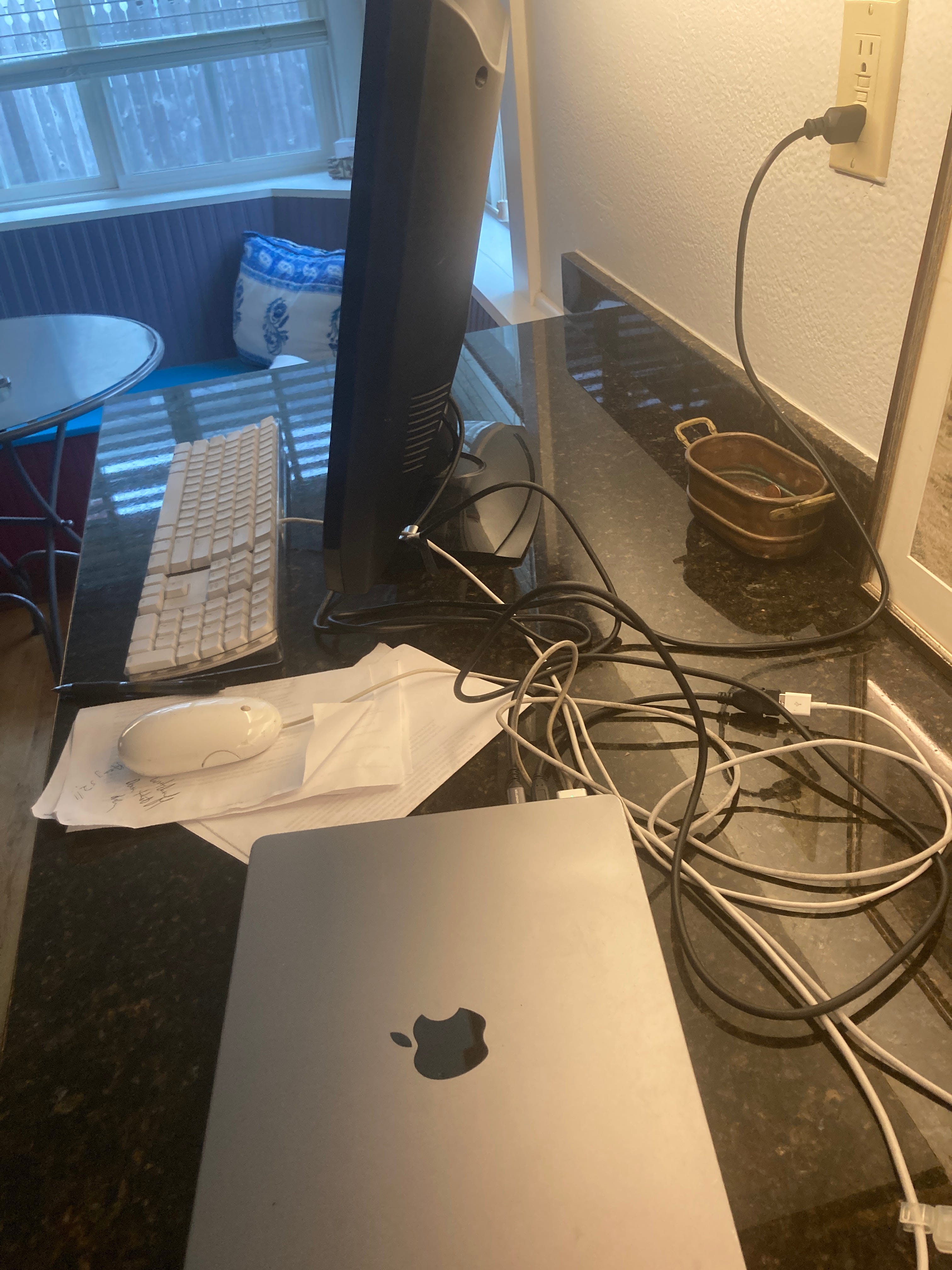
Then, I had an idea: the old TV in the crawl space. It was a 20-year-old ViewSonic, a clunky black monitor I’d stowed away because I didn’t know how to throw it out. If I could hook my MacBook Pro to the HDMI port of the TV, I would be able to work. That struck me as a revelation. First, I needed a connector — HDMI to USB-C. I didn’t have one, and it was New Year’s Eve at 3 p.m. I went to ACE Hardware and, miracle of miracles, they had one. The cable fit, but I found another problem. When you lose your screen, you cannot hook up to another monitor while the laptop cover is open. You have to work in “clamshell mode” — i.e., with a closed lid. How would I use a keyboard? And what about a mouse?
I tore through my old equipment. The first keyboard I found didn’t work. I found another, and luckily I had a USB-A to USB-C adapter. I did the same with a mouse. In the end, I had the TV, the mouse, and the keyboard hooked into the computer. I turned on the TV and wondered how I could start the computer with the lid closed. I opened it momentarily, pressed the power button, and quickly closed it. In a miracle of technology, the image appeared on the TV monitor. I was able to type on the external keyboard and use the mouse — with the proviso that I had to put the mouse on a couple of napkins so it would roll right.
I was thrilled to have put all this together and found that I was even hooked up to my favorite sites. I didn’t even care that I had nothing to say, nothing to write, and nothing to do. The screen worked.
I tried to work in clamshell mode for a little bit, but juggling hardware sapped my creativity. The equipment was so fusty that I felt I was back in 1999.
Sure, I could’ve used the old laptop from 2011 in my cabinet drawer, worked on my iPhone, or implored my wife for the use of her machine.
Instead I took it as an omen.
During the next few days, I welcomed the New Year, greeted friends, ate pastry, and ran against the wind in the rain. I read the first 150 pages of Gene Lees’ 1995 biography of Woody Herman, “Leader of the Band.”
Three days later, I thought I’d open the lid. It was a big moment. I detached the cable to the ViewSonic as if unhooking a patient from an IV. I opened the lid and hit the power button. Lo and behold, it lit up. The screen was back! Sure, there were new gray, shaded vertical lines in the background, but I can work with those. I am now back to working with the laptop on my lap, the screen fully open. I’ve left clamshell mode, but a part of me misses it — the do-it-yourself-ness, the being forced to turn off the machine, and the idea that we can live without these wondrous creations of metal counterintuitively called “Apple.”
Your saga of cool persistence is uplifting, Rick! When my Mac Pro finally expired of old age, and I was strapped for cash, I decided to shift to a more affordable Chromebook. I didn't have confidence in my DIY-ness. I miss the Mac, and will probably get one again, but the Chromebook universe is okay and connects to my Galaxy phone.
My laptop has had some mysterious death…I didn’t clean although it needs it…I woke to a series of O’s across the screen.. I had already decided to stop reading or listening to any of the horrible news that has been devastating to my mental wellness so it didn’t bother me too much. I can check emails on my iPad. I trust the news will remain horrifying and there is nothing I can do about it. You had a pretty ingenious solution. Luckily my sister is a computer nerd so she helped me save my files and she is going to help rebuild it via telephone. Glad yours came back to life.